Most small teams pick a work tool the way they pick a lunch spot: whatever a friend mentioned last. Skip that. Notion vs Trello for small business comes down to 3 questions. How many people are on the team, what are you tracking, and who will maintain the setup?
The ratings won’t settle it. On G2, Notion scores 4.6 out of 5 across 13,980 reviews, and Trello scores 4.4 across 14,072. Both are well liked. Pricing, limits, and gaps are where they split.
This breakdown uses public pricing as of November 2026 and the complaints reviewers repeat most. By the end, you’ll know which tool fits your team size and budget. You’ll also see which one costs more than it looks. Here’s how they differ where it counts.
Notion vs Trello for small business: what each tool is built for
Trello is a board. You get lists, cards, and drag and drop, with almost no training. Notion is a workspace that combines documents, wikis, databases, and tasks in one place. That cuts down on app sprawl.
That difference shapes everything else. Trello answers “what stage is this job in?” Notion answers “where did we write that down?”
Take a 4-person design studio with 12 client projects. Each project needs a brief, a feedback log, and a status. Trello handles the status in minutes. Notion handles the brief and the log, but someone has to build the structure first.
The ease gap shows up in the scores. A comparison published by monday.com, a competitor to both, cites G2 ease of use at 9.0 for Trello and 8.4 for Notion. Treat it as a rough guide, not gospel.
(Trello rarely needs a champion. Notion usually wants one.)
What each tool costs a 5-person team
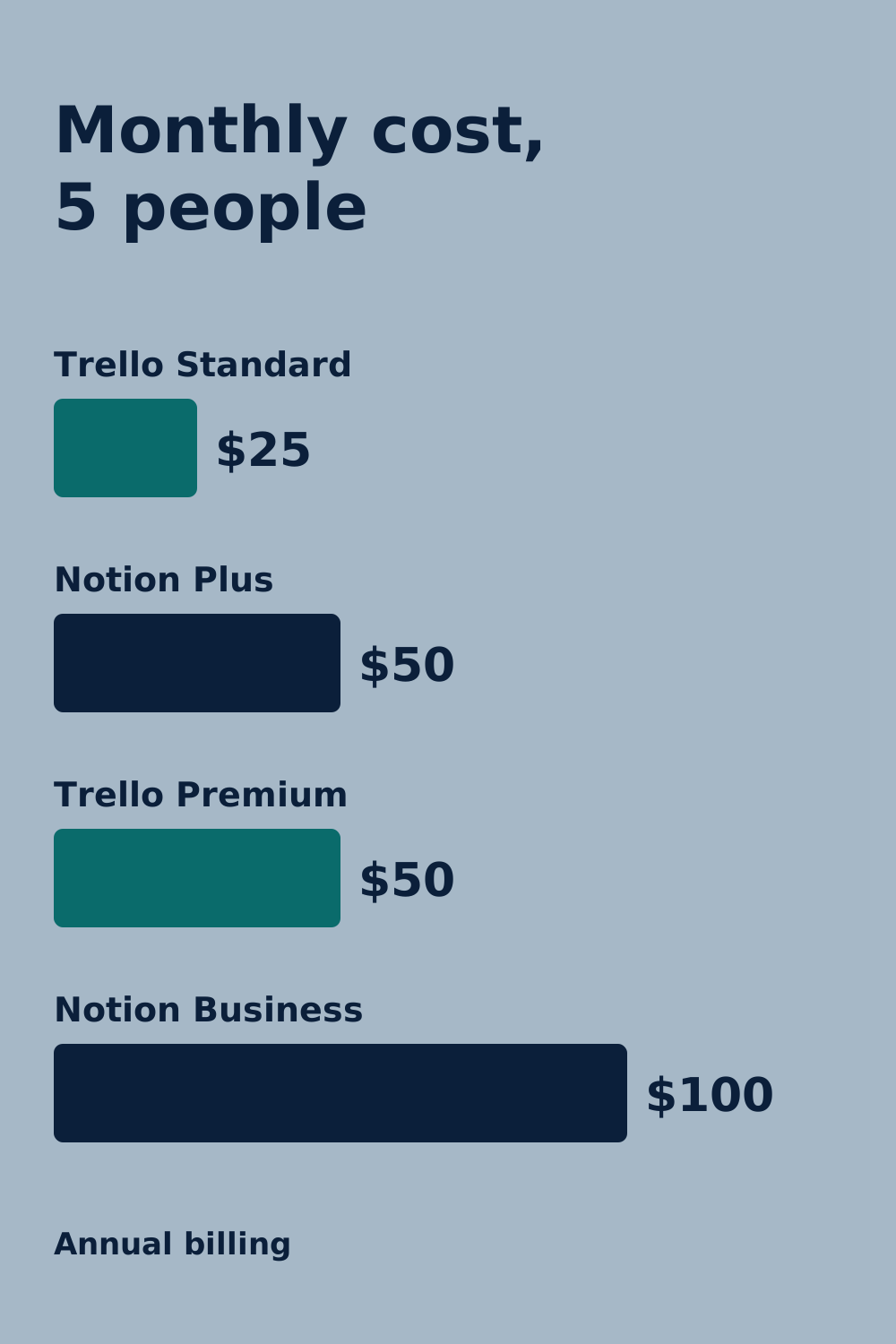
Here’s the math. Prices are per person per month, billed annually: Notion Plus is $10, Trello Standard is $5, and Trello Premium is $10. For 5 people, that’s $50, $25, and $50 a month.
Monthly billing runs higher, at $12 for Notion Plus and $6 for Trello Standard. Five people on monthly Notion Plus pay $60.
The free plans differ more than the prices do. Trello’s free plan allows up to 10 collaborators and 10 open boards per Workspace. It also caps automation at 250 runs a month and attachments at 10 MB.
Notion’s free plan is built for 1 member. Add a second person and you’re looking at Plus.
(Notion’s free plan is generous, as long as you’re the only one using it.)
AI is the other line item. Notion retired its standalone AI add-on in May 2025, so full AI now sits in Business at $20 per member, billed annually. For 5 people, that’s $100 a month.
Business also meters AI at 1,500 Standard and 500 Select credits per member each month, and extra credits cost $10 per 1,000. Skip it unless AI is the reason you’re buying.
If you need a free tool for a team of 2 to 10, Trello wins on price. Simple as that.
Where Trello runs out of room
Trello keeps things light, and that’s also its ceiling. Card descriptions support only markdown, so there’s no long-form document editor, searchable wiki, or relational data. You’ll need Google Docs, Confluence, or Notion alongside it.
It also lacks native time tracking, billing, bulk card editing, and dependency-based Gantt charts. Time tracking, billing, and true dependencies come through paid Power-Ups. Those cost extra, and the bill grows with every one.
Say a 6-person agency wants billable hours per client. In Trello, that means a paid Power-Up for each missing piece. One G2 reviewer put it bluntly: “Trello is good for small teams, not growing teams.”
Views are gated too. Calendar, Timeline, Table, Dashboard, and Map views start on Premium at $10 per user, billed annually. Notion’s table, board, calendar, timeline, list, and gallery views are available on its free plan.
Mistake: stacking Power-Ups. The fix is to price a Premium plan first, then compare it to the add-ons you’d buy. (Power-Ups are how a cheap tool becomes a pricey one.)
Where Notion runs out of patience
Notion’s problem is the blank page. G2 reviewers describe a steep learning curve, blank-canvas overwhelm, and confusion between workspaces and teamspaces. A Capterra reviewer called it too clunky and over-complicated for the tasks their team had in mind.
Reddit threads add a pattern. Notion tends to need a dedicated admin to build and maintain it. Teams often keep Notion for client portals and wikis, and pair it with Trello or Linear for day-to-day tasks.
Then there are the hard gaps. Notion has no native visual workflow builder across databases, so multi-step automation needs Zapier, Make, or the API. Offline editing is limited, and mobile gets slow once a database passes 500 entries.
Take a 3-person consultancy with 600 client records. Searching them on a laptop is fine. Pulling them up on a phone between meetings is where the lag shows.
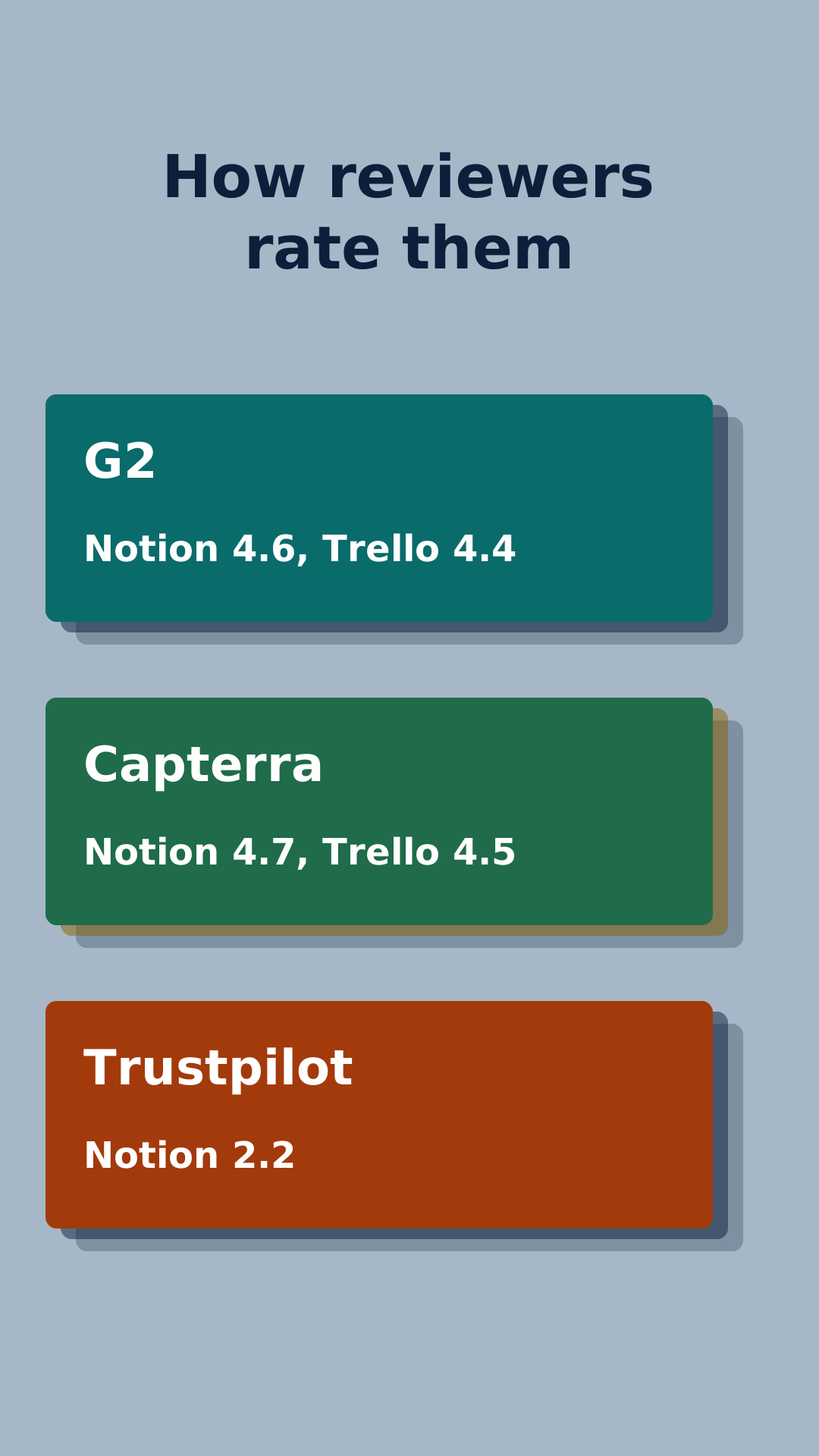
Trust is a weak spot too. Trustpilot rates Notion 2.2 out of 5 across 446 reviews, with slow support and billing complaints leading the list. G2 and Capterra run far higher, at 4.6 and 4.7. Read both sides before you decide.
(Blank pages are great until you’re the one filling them.)
How to choose in 20 minutes
Use these rules:
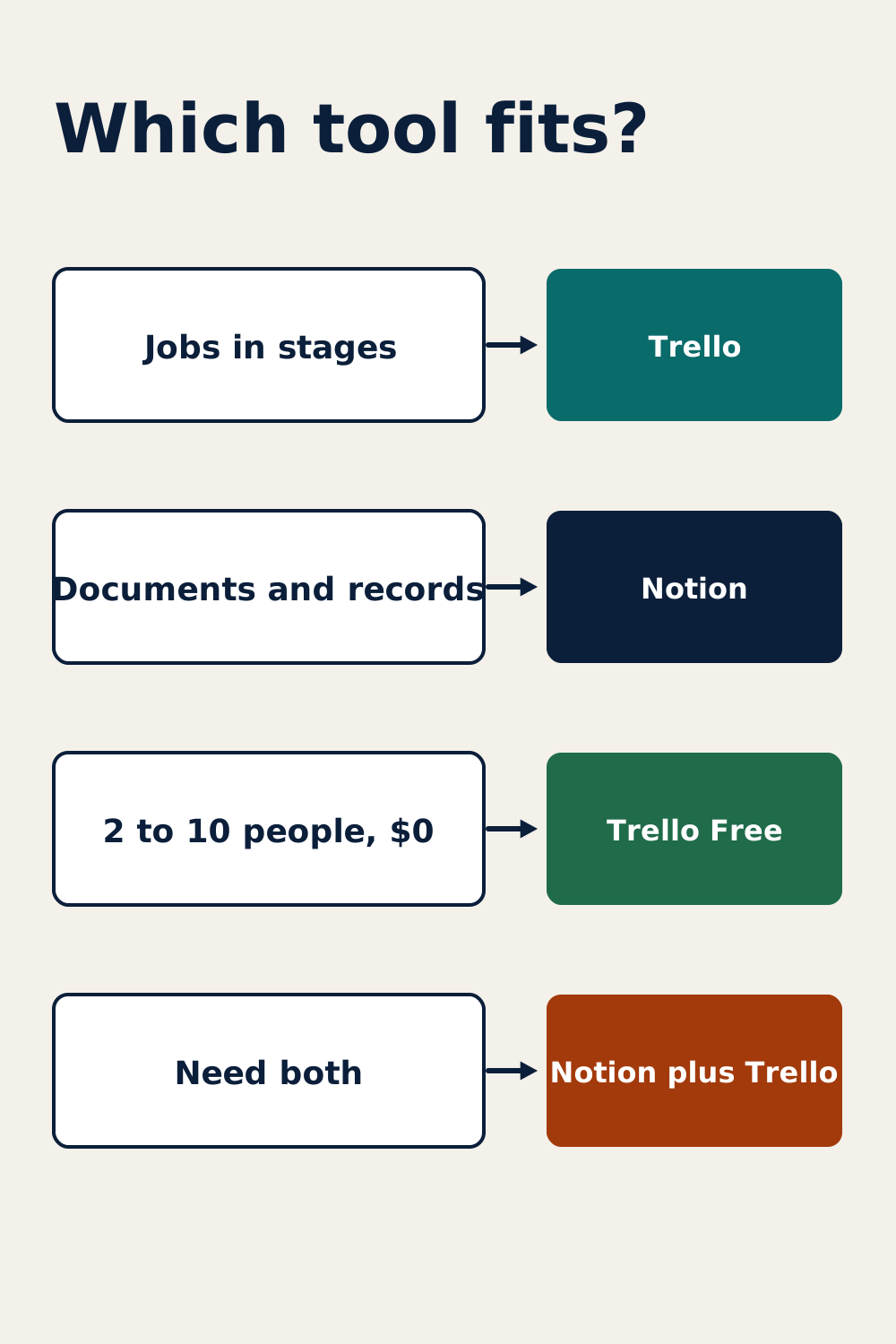
- If your work is a pipeline of jobs moving through stages, pick Trello.
- If your work is mostly documents, SOPs, and client records, pick Notion.
- If you have 2 to 10 people and a $0 budget, start with Trello Free.
- If nobody has a few hours to build a setup, skip Notion for now.
- If you need both, use Notion for the wiki and Trello for tasks, as Reddit threads describe.
Do this today: list your last 10 slipped tasks. Mark each one “lost in a doc” or “stuck in a stage.” Pick the tool that fixes the bigger pile. Twenty minutes, tops.
(The sticky note on your monitor counts as a system. A bad one.)
Notion vs Trello at a glance
| Capability / Metric | Specification / Availability | Operational Relevance for Small Business |
|---|---|---|
| Core focus and primary use case | Notion: documents, wikis, databases, and tasks in one workspace. Trello: Kanban boards, lists, and cards with no-code automation. | Notion fits knowledge-heavy work. Trello fits stage-based work. |
| Pricing tier architecture | Notion: Free, Plus $10, Business $20 per member (annual). Trello: Free, Standard $5, Premium $10 per user (annual). | Trello costs half as much at the entry paid tier. |
| Primary hard limits | Notion Free: 1 member, 10 guests, 5 MB per file. Trello Free: 10 collaborators, 10 open boards, 10 MB per attachment, 250 automation runs a month. | Trello Free works for a small team. Notion Free works for one person. |
| Key standout feature | Notion: relational databases with multiple views. Trello: drag-and-drop boards plus Butler automation. | Notion links records across projects. Trello gets a team moving fast. |
| Primary feature gap | Notion: no native visual workflow builder. Trello: no document editor, wiki, or native time tracking. | Notion needs Zapier, Make, or the API. Trello needs a docs tool and paid Power-Ups. |
🔎 TOOL SNAPSHOT
Notion
Best for: Teams that run on documents, wikis, and client records
Starting price: Free for 1 member; Plus at $10 per member per month, billed annually
Biggest limit: Free plan covers 1 member, and adding a second triggers Plus
Trello
Best for: Teams that move jobs through stages
Starting price: Free for up to 10 collaborators; Standard at $5 per user per month, billed annually
Biggest limit: 10 collaborators and 10 open boards per Workspace on Free
Frequently Asked Questions
Is Notion better than Trello for project management?
It depends on the project. Trello is better for simple stage-based tracking, with drag-and-drop boards and almost no setup. Notion is better when projects also need documents, client records, and linked databases. Trello’s native gaps include dependencies and time tracking, so complex projects need paid add-ons.
Is Trello easier to use than Notion?
Yes. A monday.com comparison cites G2 ease of use at 9.0 for Trello and 8.4 for Notion. Trello needs little training, while Notion’s blank canvas and workspace structure take longer to learn. Notion rewards the setup time with more flexibility for documents and databases.
Which is better for startups, Notion or Trello?
For a startup on a tight budget, Trello is the safer start. Its free plan covers up to 10 collaborators, and Standard costs $5 per user monthly on annual billing. Notion suits startups that need an internal wiki and have someone willing to build the workspace.
Does Notion have boards like Trello?
Yes. Notion databases can switch to a board view alongside table, calendar, timeline, list, and gallery views. These views are available on the free plan. The difference is setup. Trello’s boards come ready to use, while Notion’s board view is one of several views of a database you configure.
Can Notion be used as a Trello replacement?
Often, yes, if your team also needs documents and databases. Notion’s board view covers basic Kanban work. You’ll give up Trello’s ready-made drag-and-drop simplicity and Butler automation. Some teams run both, using Notion for wikis and client portals and Trello for tasks.
The verdict
Trello is the better fit for small teams that track jobs through stages on a tight budget. Notion is the better fit for teams that live in documents, SOPs, and client records and can spare someone to build it. Choose Trello if you need to start today. Choose Notion if the real problem is scattered knowledge. Both are well rated, with G2 scores of 4.4 and 4.6, so the deciding factor is fit. Before adding any tool to your stack, price it for your actual headcount, then test it free for a week.

Leave a Reply
You must be logged in to post a comment.